
At a glance
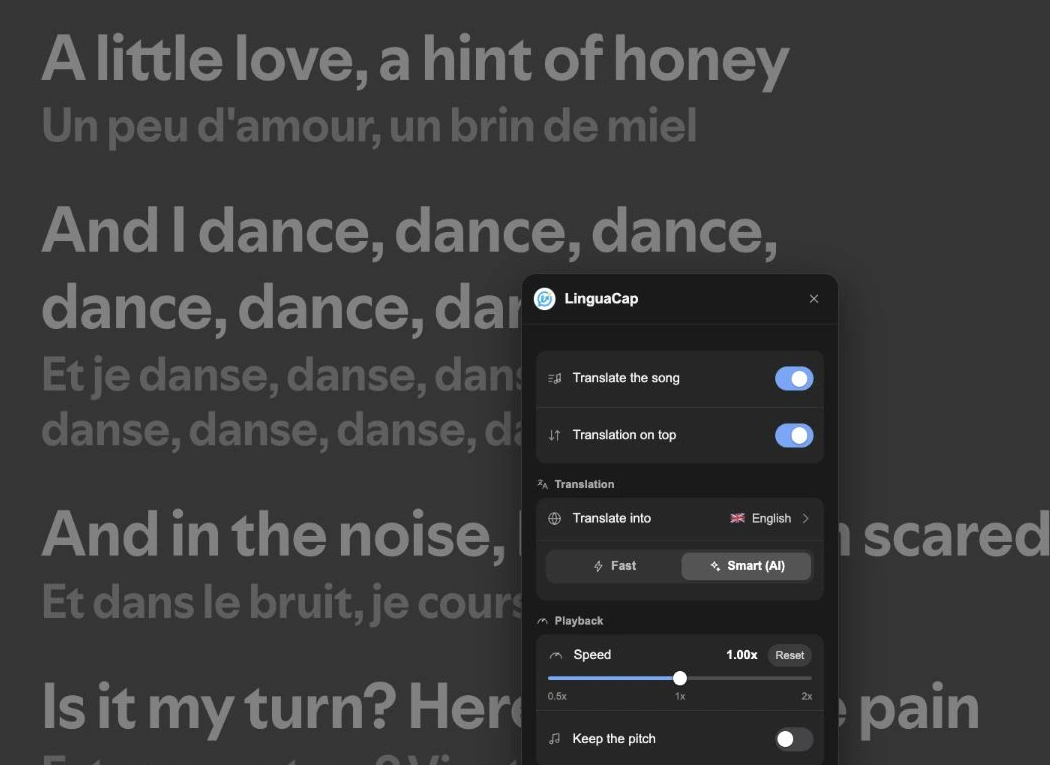
In the Spotify web player, play a song and click the microphone icon marked Lyrics. Open the LinguaCap button beside the playback controls and turn on Translate the song. The translation uses the language you set in LinguaCap.
Turn on lyrics and their translation
Install LinguaCap for Chrome and sign in to the extension. In LinguaCap, set your native language to the language you want to read the translation in.
- Open open.spotify.com in Chrome on your computer. Start a song that has lyrics.
- Click the microphone icon in the playback bar to open Lyrics.
- Click the LinguaCap button beside the playback controls. In Song lyrics, turn on Translate the song.
- Keep the lyrics view open while the track plays. Read the translation alongside the original. Use Translation on top if you prefer the reverse order.
If the translation does not appear
- If Lyrics is missing or Spotify says there are no lyrics for this song, try another track. LinguaCap needs the text Spotify displays and cannot transcribe the recording.
- If the original lyrics appear but the translation is missing, make sure Translate the song is enabled and the extension is signed in. Try another track with lyrics to see whether the issue is specific to that song.
- If the translation uses the wrong language, check your native language in the extension. Spotify’s own interface language is a separate setting.
- If a song has several versions, try the album or single version. A live recording or remix can have a different lyrics listing.
Use one verse for listening practice
Pick a verse of four or five lines. Listen once without reading and write down one word you recognise. Play the verse again while following the original, then read the translation to check the meaning. Replay one line and say it at your own pace.
Songs stretch syllables and bend normal word stress. To practise the same phrases in conversational speech, use a video with dual subtitles.
Frequently asked questions
Does this work in the Spotify desktop or phone app?
This LinguaCap method uses the Spotify web player in desktop Chrome. The native Spotify apps do not run Chrome extensions.
Can LinguaCap translate a song with no lyrics in Spotify?
The extension translates the lyrics displayed by Spotify. Try another version of the track or choose a song with lyrics.
Can I see the original and translation together?
Yes. Open Lyrics and enable Translate the song in LinguaCap. You can choose which line appears on top.
Sources and verification
This article was prepared by the LinguaCap team. Site and app features and plan terms may change; confirm current details at the official sources.
Translate lyrics in the Spotify web player
Add LinguaCap to Chrome and try a song with lyrics.